



Overview
In this simulation, I engaged with the TryHackMe SOC Simulator to gain hands-on experience in security operations, specifically focusing on incident analysis and reporting. The simulation provided a realistic environment to practice identifying, investigating, and responding to various security alerts, including phishing attempts and blacklisted URL access. I utilized a SIEM (Security Information and Event Management) dashboard to triage incoming alerts, analyze relevant logs, and apply threat intelligence to determine the nature and severity of each incident. This walkthrough demonstrates my ability to systematically approach security incidents, classify them accurately, and formulate comprehensive reports with clear remediation actions.
Key Skills Demonstrated
Incident Analysis & Triage, SIEM Operations (Alert Queue Management, Log Analysis), Threat Intelligence Utilization (Domain and URL analysis), Phishing Detection & Analysis, Typosquatting Identification, Firewall Log Analysis, Endpoint Log Analysis, Incident Reporting (Five Ws Framework), False Positive/True Positive Classification, Remediation Planning & Recommendation, Security Awareness Principles
Understanding Incident Reporting: The Five Ws Approach
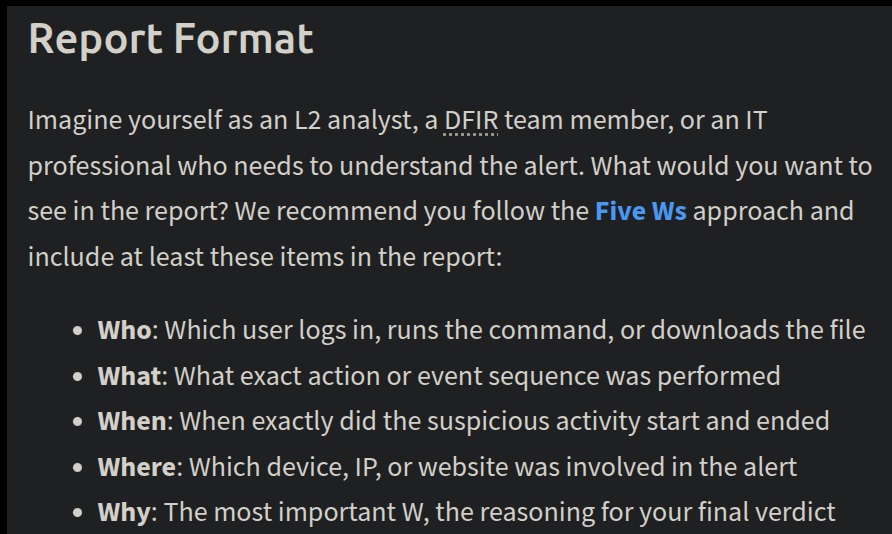
In the SOC Simulator, a crucial aspect of incident analysis is effectively communicating findings. Here you can see the structured reporting format I will be using to report each incident, based on the 'Five Ws' (Who, What, When, Where, Why).
Navigating the SIEM Dashboard: The Alert Queue
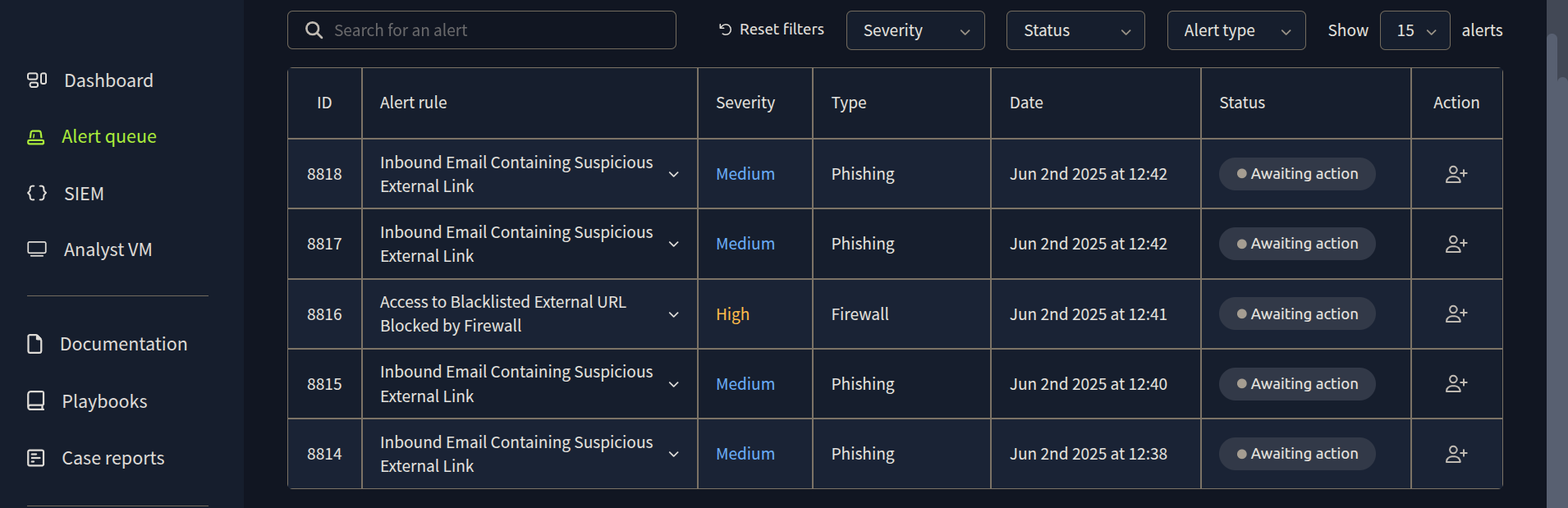
Upon entering the SOC Simulator, my primary interface for identifying potential threats was the SIEM (Security Information and Event Management) dashboard. Here, I'm viewing the 'Alert queue,' which provides a centralized list of security alerts generated by various systems. This view allowed me to quickly assess incoming incidents, noting their ID, alert rule, severity, type, and the time they were generated.
Investigating the First Alert: Inbound Email Analysis
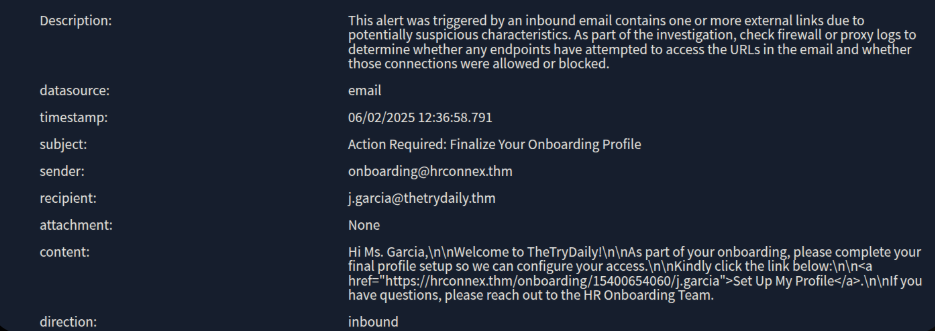
Beginning with the earliest alert in the queue, I initiated the investigation process. This particular alert flagged an inbound email containing a suspicious external link. There's no attachment on the email so all we have is the sender's domain name. So, let's focus on this.
Analysis and Reporting: Classifying the Alert
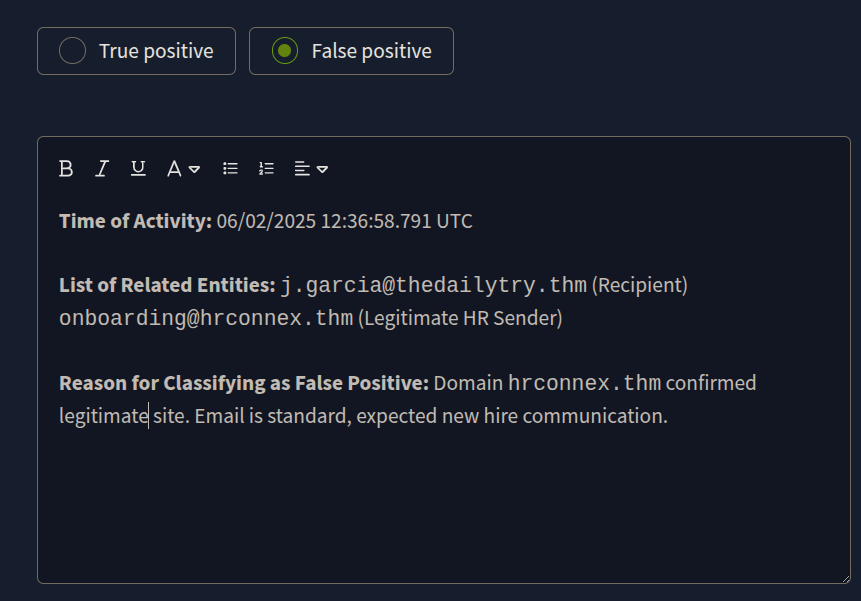
After leveraging the threat intelligence tools provided within the simulator, I was able to confirm that the hrconnex.thm domain was not malicious. Based on this finding, the alert was classified as a 'False Positive'. Here you can see my final report entry.
Investigating the Second Alert: Suspicious Amazon Email
Moving on to the next alert, I immediately noticed some unusual characteristics. The sender's domain, amazon.biz, appeared to be an impersonation attempt of a legitimate service. Furthermore, the email itself contained a shortened link, which is often a tactic used in malicious campaigns.
I started my initial checks with threat intelligence tools and it indicated that amazon.biz itself wasn't directly flagged as malicious. But this does not mean that we can automatically classify the alert as a false positive. My investigation then shifted to the shortened link within the email. My further analysis with threat intelligence tools confirmed that this link was indeed malicious.
At this critical point, the next step of mine was to determine if the recipient, h.harris@thetrydaily.thm, had clicked on this malicious link and visited the associated address. To investigate this, I will definitely be leveraging the SIEM to examine relevant logs.
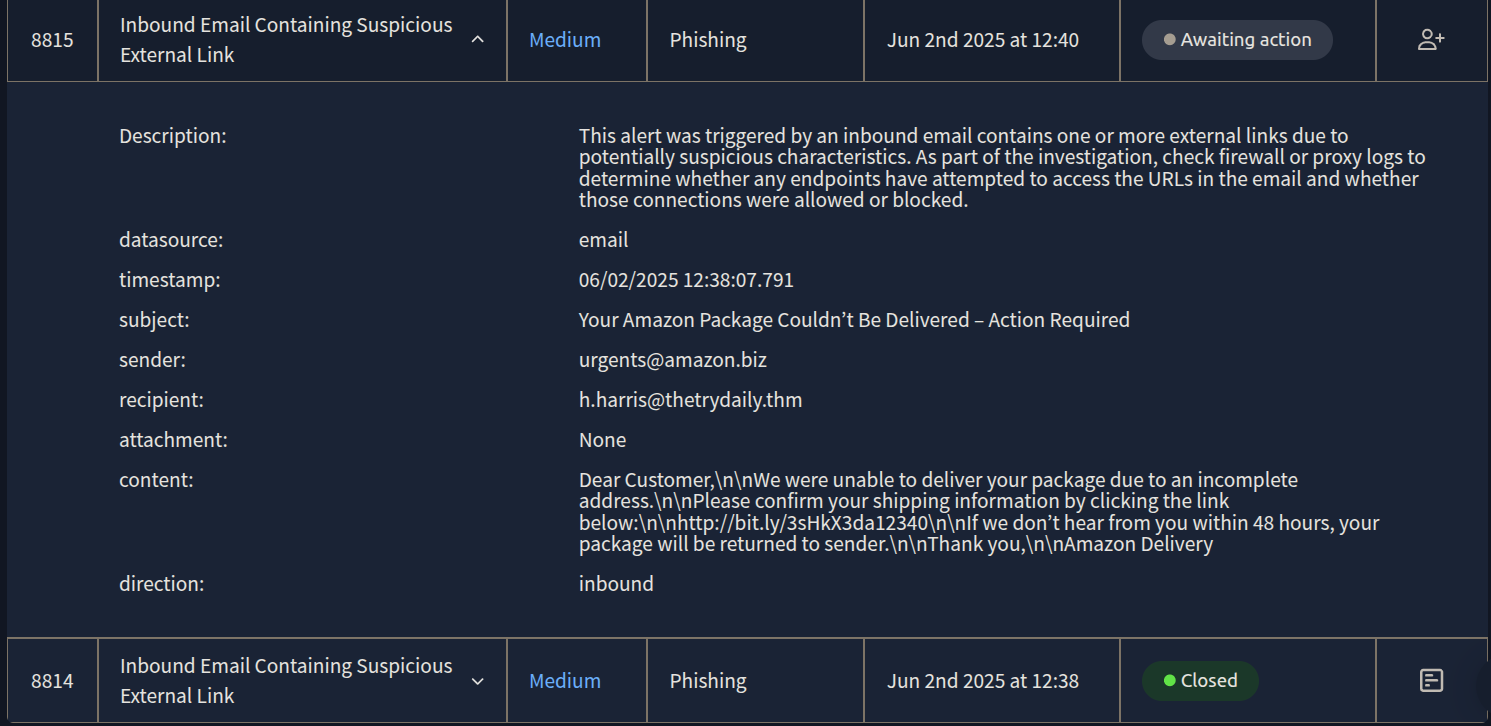
I can see that fortunately the firewall has blocked this connection. Now, it's time to write my report.
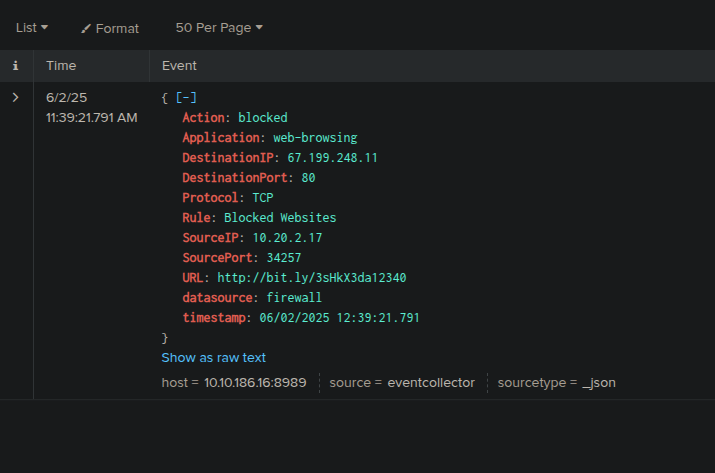
The 'True Positive' Report
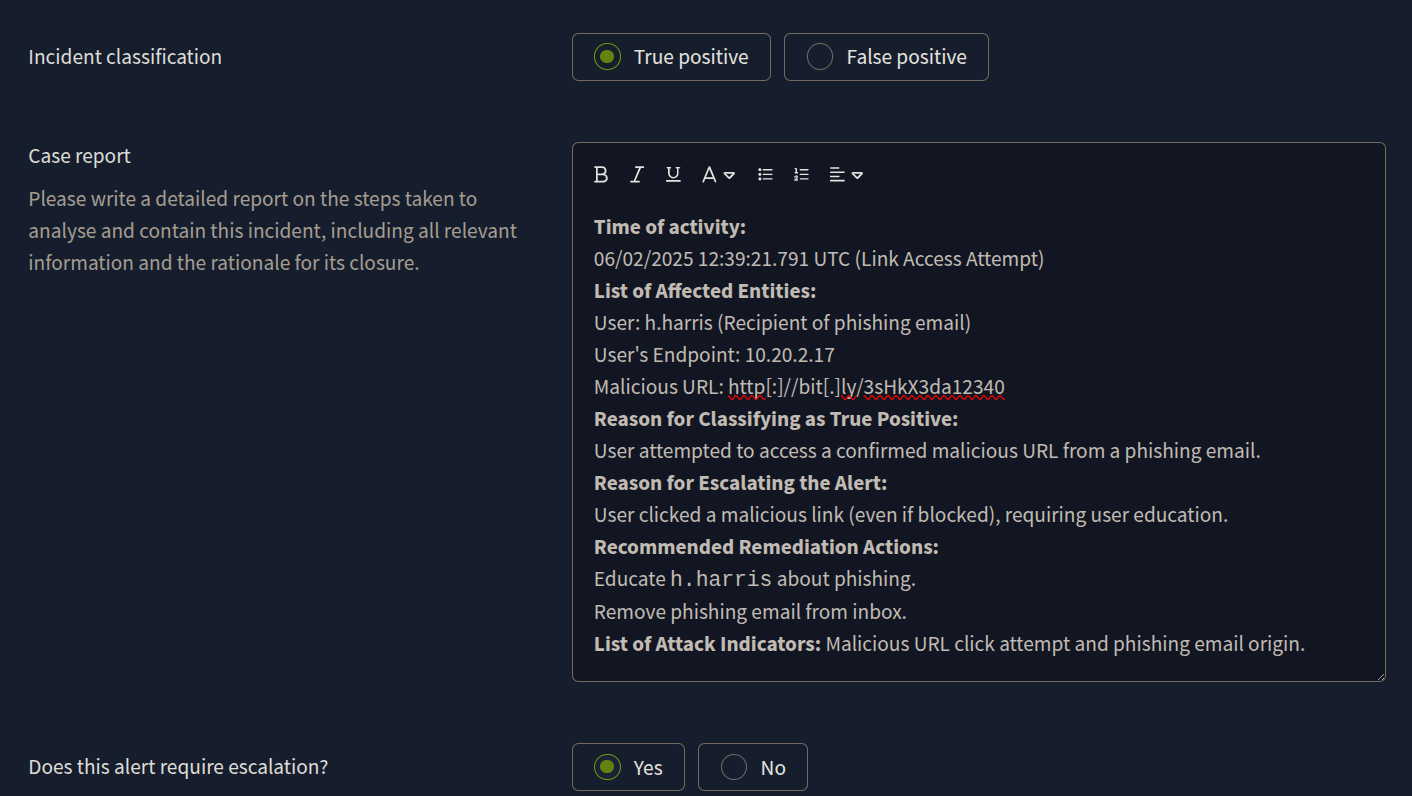
* Time of activity
06/02/2025 12:38:07.791 UTC (Email Receipt)
User attempted access to malicious URL at 06/02/2025 12:39:21.791 UTC
* List of Affected Entities
User: h.harris@thedailytry.thm (Recipient of the phishing email)
Email Domain (Impersonated): amazon.biz (Sender of the phishing email)
Malicious URL: http://bit.ly/3sHkX3da12340
User's Endpoint: SourceIP: 10.20.2.17 (Attempted to access the malicious URL)
* Reason for Classifying as True Positive
After the investigation, it is shown that the link "http[:]//bit[.]ly/3sHkX3da12340" is malicious.
* Reason for Escalating the Alert
The alert can be an indicator of a major cyberattack (phishing) requiring deeper investigation, even though the malicious link was blocked by the firewall. Remediation actions are required to ensure the user is aware and the threat is contained.
* Recommended Remediation Actions
Email Removal: Remove the malicious email from h.harris@thedailytry.thm's inbox to prevent further user interaction.
User Notification/Awareness: Inform h.harris about the phishing attempt, emphasize that the link was blocked, and reinforce phishing awareness training. This is crucial for user education since they did click the link.
URL Blacklisting: Ensure http://bit.ly/3sHkX3da12340 and amazon.biz (if not already) are blacklisted across relevant security controls (firewall, proxy, email filters) to prevent future access or similar attacks.
Endpoint Verification: Confirm no other malicious activity originated from SourceIP: 10.20.2.17
* List of Attack Indicators
Sender Impersonation: urgents@amazon.biz (not official amazon.com)
Malicious URL: http://bit.ly/3sHkX3da12340 (confirmed malicious by analysis and blocked by firewall rule Blocked Websites).
Social Engineering: Urgent subject ("Action Required"), threat of package return, generic greeting ("Dear Customer").
Phishing Lure: Undelivered package notification.
User Interaction: User h.harris attempted to access the malicious URL (from SourceIP: 10.20.2.17), leading to a firewall block.
Investigating the Third Alert: Blacklisted URL Access
This actually is same case with the previous one.
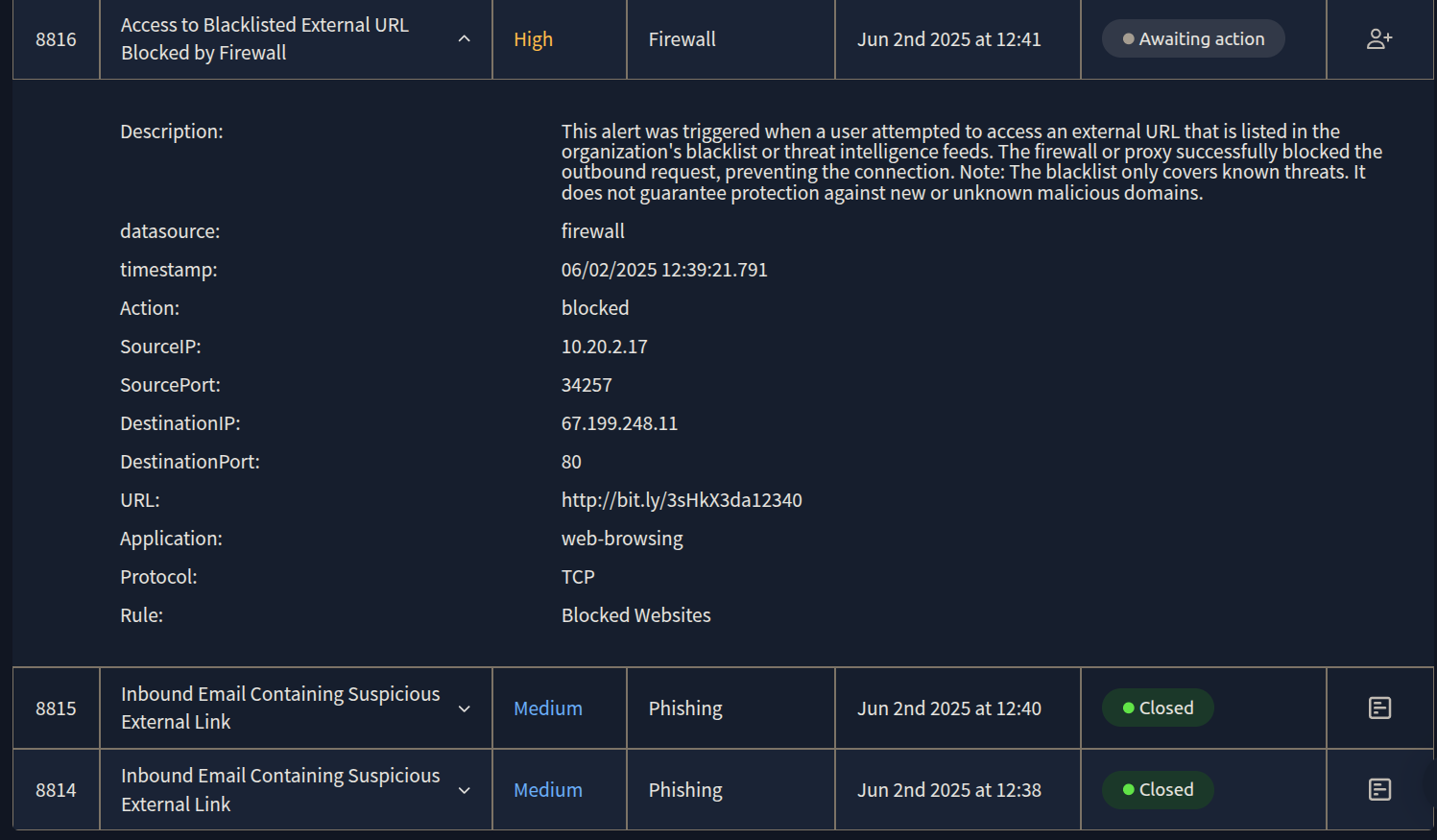
I need to ckeck SIEM for detailed endpoint logs to see if there is any unusual behavior. When i check siem i see that there's only two events for this host and everything looks normal. So, it means firewall has fully blocked the connection and user had no more interaction with the malicious site. Now it's time to write my report.
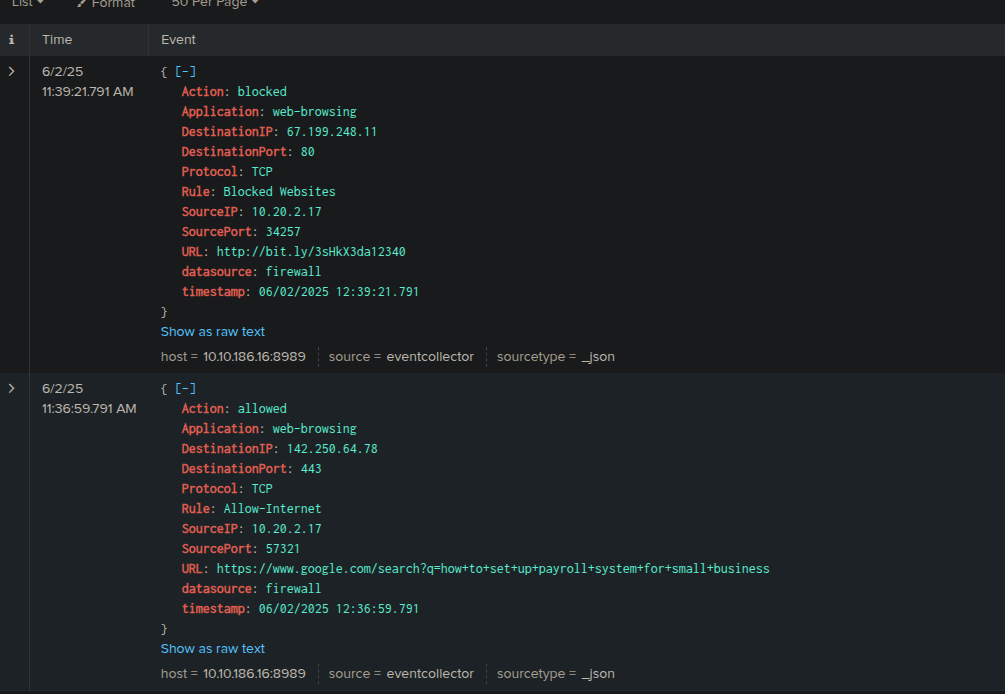
The 'True Positive' Report
Investigating the Fourth Alert: Microsoft Typosquatting and Malicious Link
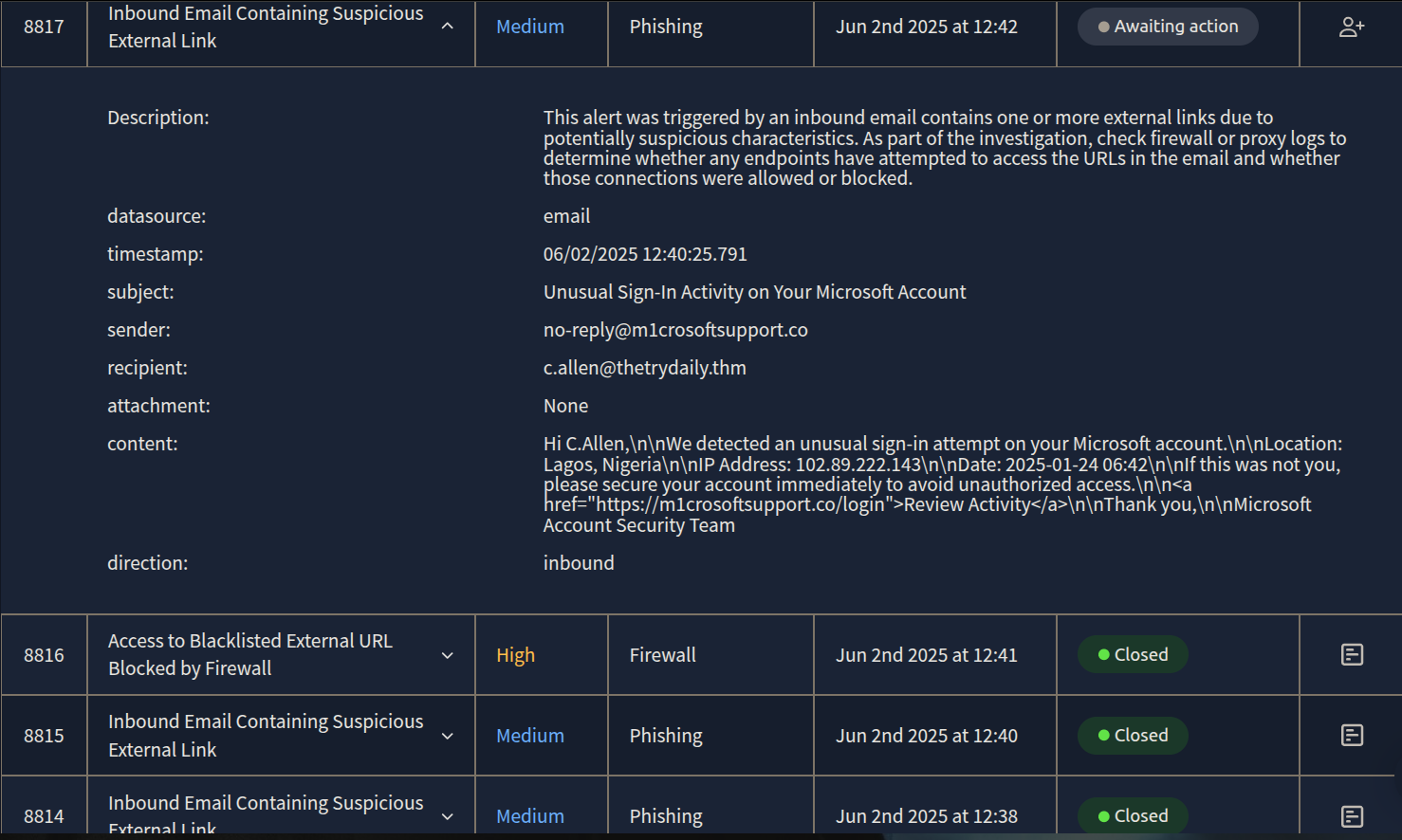
Finally, I moved to the last alert (ID 8817), which presented a clear case of typosquatting and an impersonation attack. The sender's domain, m1crosoftsupport.co, was a deliberate misspelling designed to mimic legitimate Microsoft support. This is a classic phishing tactic. The email also contained a link and upon investigation with threat intelligence tools the link was confirmed to be malicious.
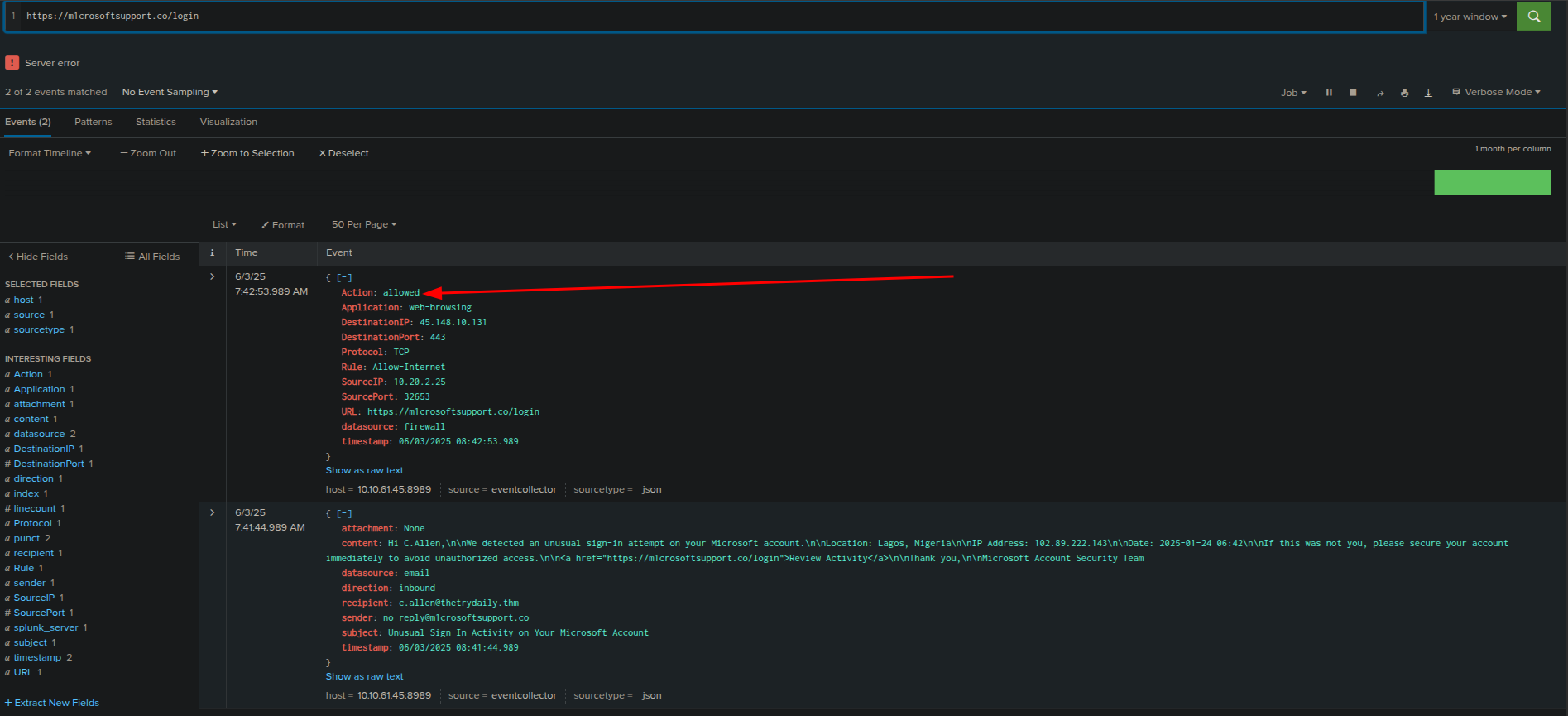
After investigating SIEM, i can clearly say that user has attempted to reach out the malicious link, and unfortunately firewall "allowed" this access. Now it's time to write my report for this case.
The 'True Positive' Report
* Time of activity
06/02/2025 12:40:25.791 UTC (Email Received)
User attempted access to malicious URL at 06/02/2025 12:41:34.791 UTC
* List of Affected Entities
User: c.allen@thetrydaily.thm (Recipient of the phishing email)
User's Endpoint: SourceIP: 10.20.2.25 (Accessed the malicious URL)
Email Domain (Impersonated): m1microsoftsupport.co (Sender of the phishing email)
Malicious URL: https://m1microsoftsupport.co/login
* Reason for Classifying as True Positive
The email impersonates Microsoft (m1microsoftsupport.co instead of microsoft.com) and uses social engineering tactics ("Unusual Sign-In Activity") to trick the recipient. Investigation confirmed that the user clicked the malicious link, and the connection was ALLOWED by the firewall.
* Reason for Escalating the Alert
This is a confirmed successful phishing attempt where the user clicked a malicious link, and the connection was allowed. This indicates potential credential compromise or malware download, requiring immediate DFIR (Digital Forensics and Incident Response) and extensive remediation actions.
* Recommended Remediation Actions
Immediate User Contact to verify if they entered credentials on the fake site.
Password Reset: Force password reset for c.allen's Microsoft account and any other accounts using the same or similar credentials.
Endpoint Isolation/Investigation: Isolate SourceIP: 10.20.2.25 from the network. Conduct a full forensic investigation of the endpoint for malware, persistence mechanisms, and further compromise.
Email Removal: Remove the malicious email from c.allen@thetrydaily.thm's inbox
URL and Domain Blacklisting: Immediately blacklist m1microsoftsupport.co and https://m1microsoftsupport.co/login across all security controls (email gateway, firewall, proxy, EDR).
Review M365 Logs: Check Microsoft 365/Azure AD logs for suspicious logins, password changes, or other activity from c.allen's account.
* List of Attack Indicators
Sender Impersonation: no-reply@m1microsoftsupport.co (not official Microsoft domain).
Social Engineering: Urgent subject ("Unusual Sign-In Activity"), fear tactics, call to action ("secure your account immediately").
Malicious URL: https://m1microsoftsupport.co/login (fraudulent login page).
User Compromise Indicator: User c.allen clicked the malicious link from SourceIP: 10.20.2.25, and the connection was allowed by the firewall.
Investigating the Fifth Alert: Suspicious PowerShell Script Attached in Email
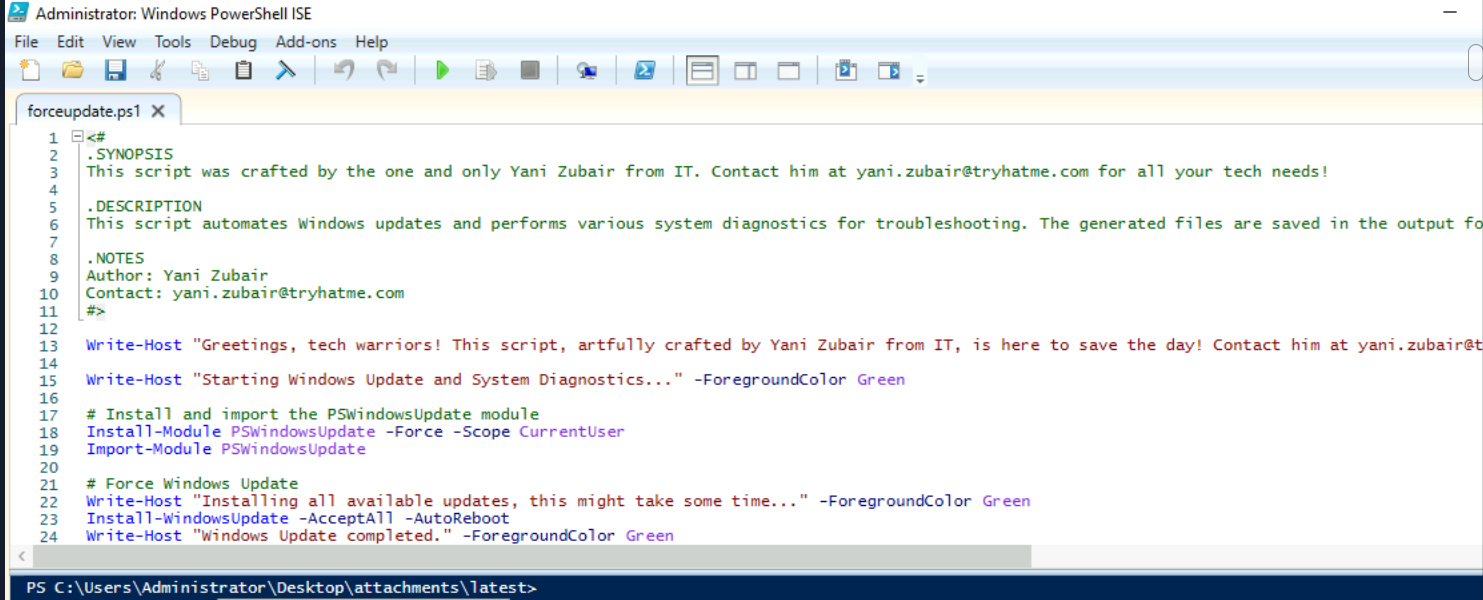
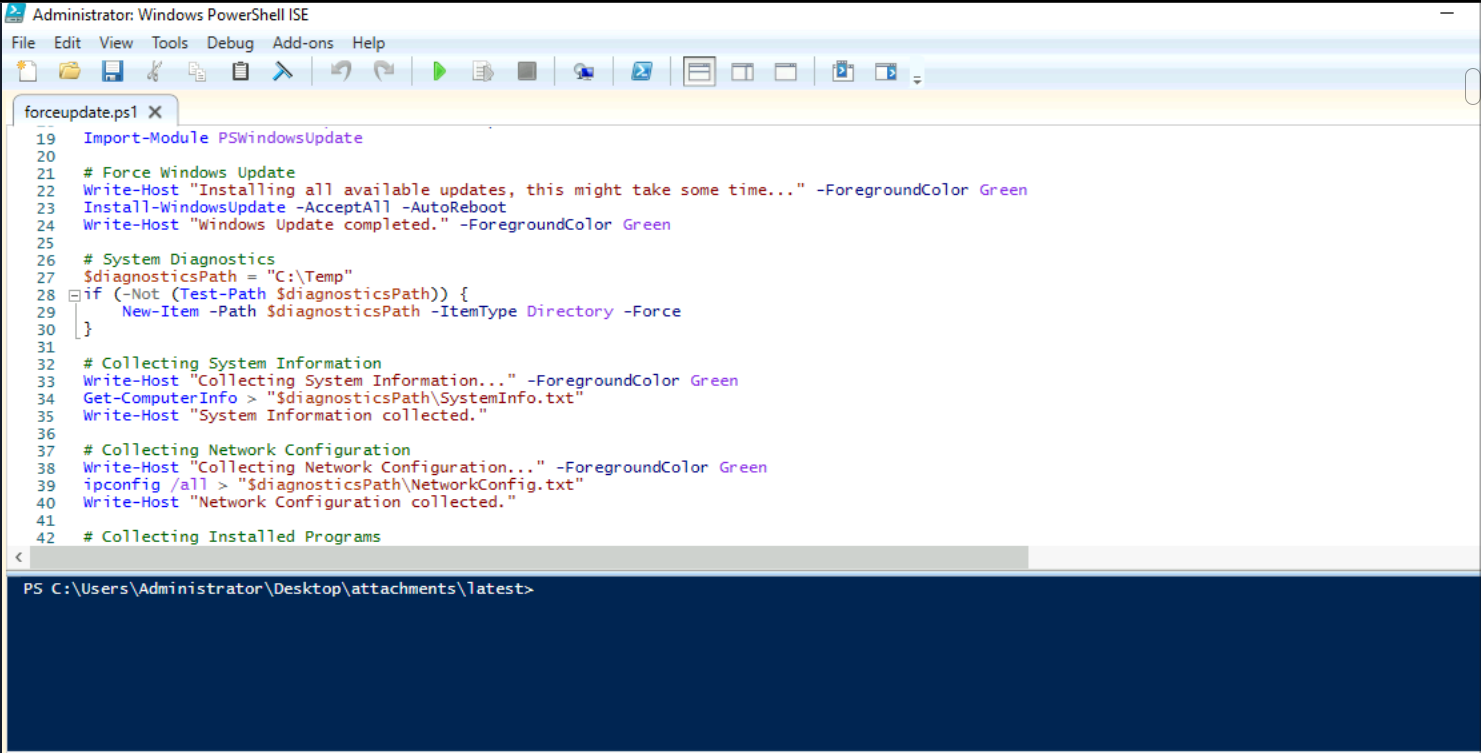
Here we have an alert that an internal email with a .ps1 (PowerShell script) attachment which is highly suspicious, especially with a generic subject like "Force update fix." PowerShell scripts can execute arbitrary commands on a system, making them a common vector for malware and malicious actions. So, my goal is going to be see for the content of the forceupdate.ps1 file to decide if it's executing legitimate commands or not.
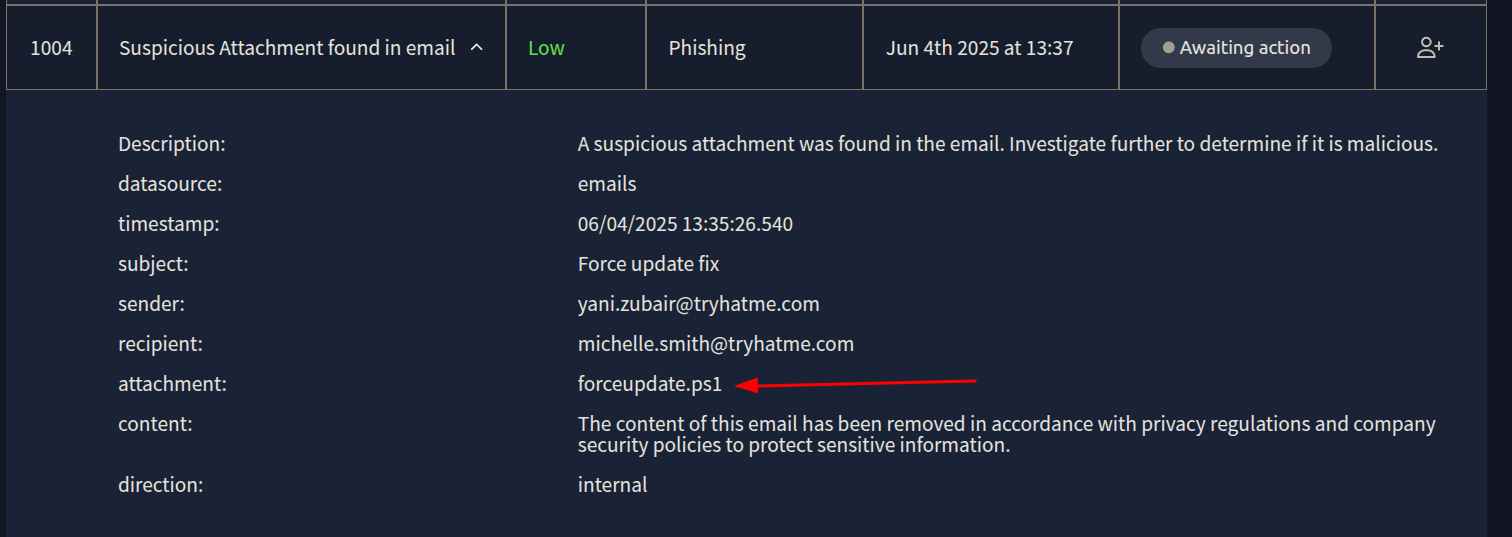
I am going back to the analyst VM to investigate forceupdate.ps1
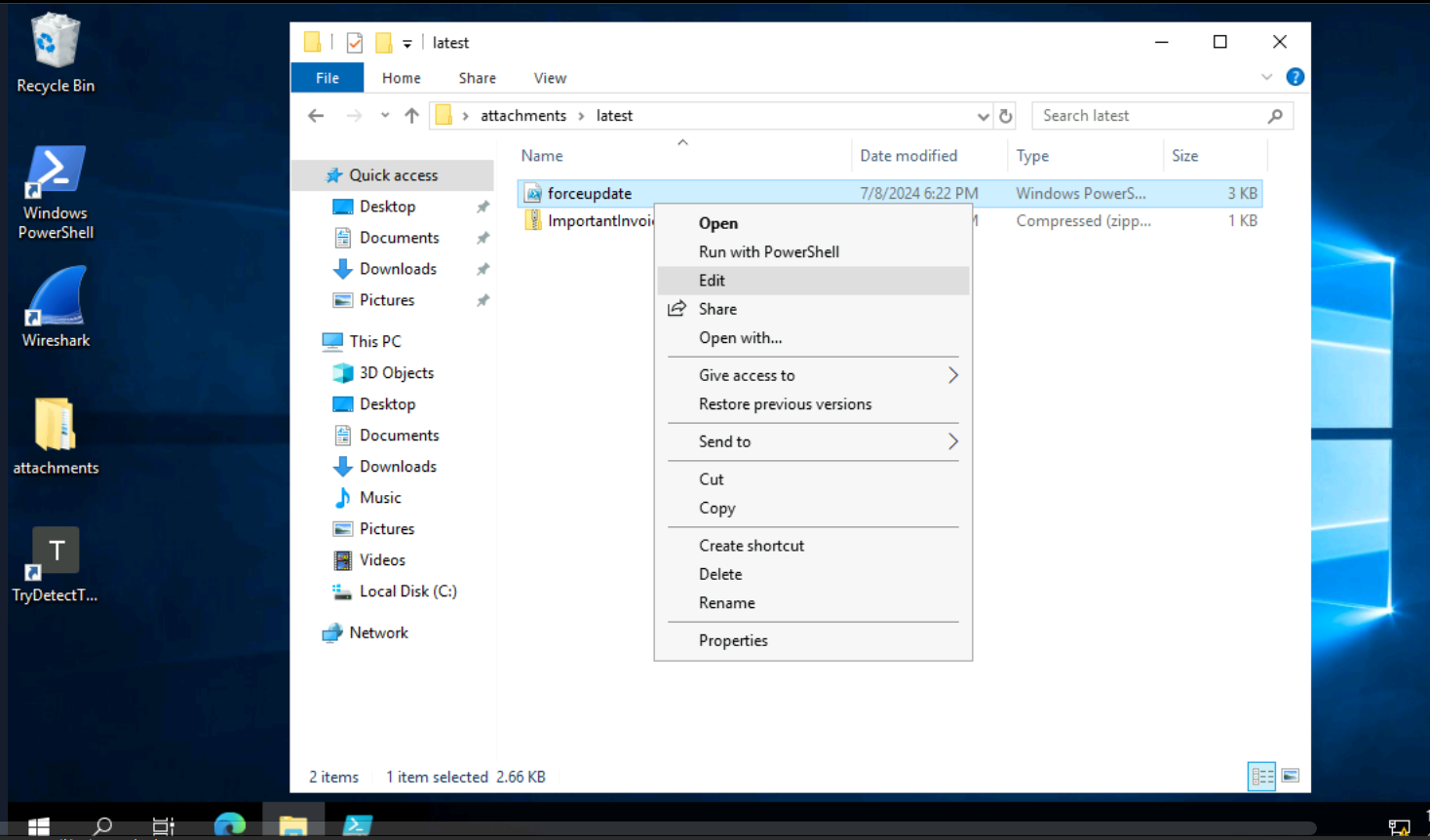
After the investigation, we can clearly see that this script is definitely coming from the IT team and only includes legitimate PowerShell commands for a Windows update. So, it's a False Positive.
The 'False Positive' Report
Who: Sender yani.zubair@tryhatme.com to recipient michelle.smith@tryhatme.com. Both users and the tryhatme.com domain are confirmed legitimate internal entities.
What: An internal email with the subject "Force update fix" containing a PowerShell script attachment named forceupdate.ps1.
When: Email received at 06/04/2025 13:35:26.540 UTC.
Where: Internal email system.
Why: The alert was triggered due to the presence of a .ps1 (PowerShell script) attachment, which is a file type commonly used in malicious attacks. However, investigation into the forceupdate.ps1 script content confirmed it contains only legitimate Windows update and system diagnostic commands. The sender and recipient are confirmed legitimate internal users, and the tryhatme.com domain is a verified legitimate internal domain. Therefore, this is a False Positive as the attachment is benign and part of legitimate internal IT operations.
There we go!
